Guía · Audiovisual · Básico · Generación
Anuncio en video estilo mundo en miniatura para COMIDA Y RESTAURANTES
Obreros diminutos construyen tu producto pieza por pieza en 10 segundos. El ejemplo es una pizza, pero el prompt sirve para lo que vendas.
¿Qué es esto y cómo lo uso?
Una guía paso a paso. Síguela de arriba hacia abajo desde tu celular; no descargas nada.
Objetivo
Convertir la foto de tu producto en un anuncio de 10 segundos donde obreros en miniatura lo construyen. Sin grabar nada y sin editar video.
Lo que necesitas antes de empezar
- Una cuenta de Google Flow — la herramienta de Google que convierte imágenes en video.
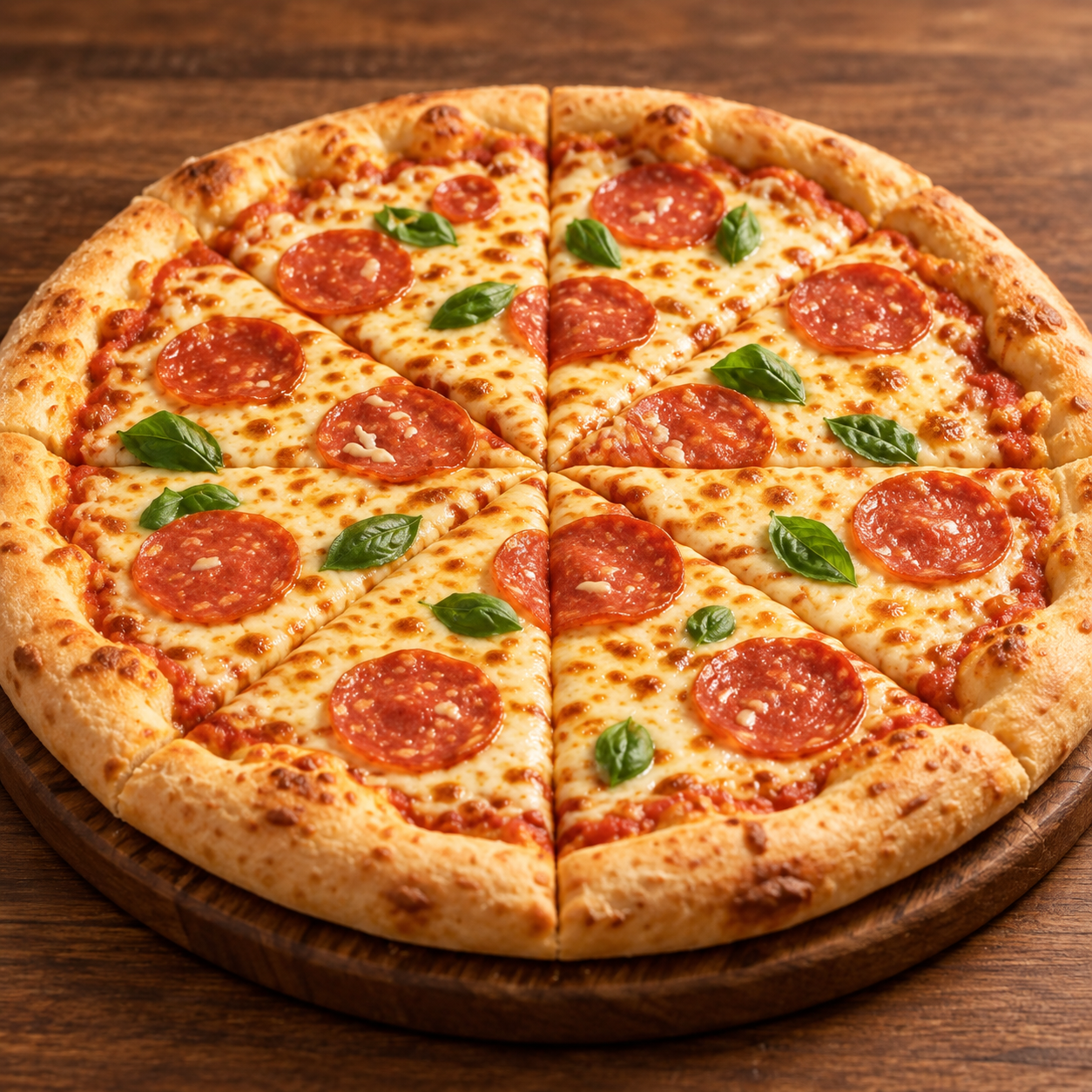
- Una buena foto de tu producto, de frente, con buena luz y fondo limpio.
Eso es todo. No necesitas ChatGPT: el prompt ya está hecho.
Paso 1 — Ten lista la foto de tu producto
Entre más nítida, mejor. La cámara se acerca mucho en las tomas de detalle, y todo lo que tu foto no alcance a mostrar, la IA se lo inventa.
Paso 2 — Configura Google Flow
Configúrala así antes de escribir nada:
- Tipo: Vídeo · Modo: Ingredientes · Cantidad: 1x · Modelo: Omni Flash · Duración: 10 s
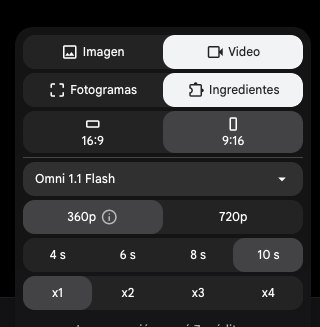
Ahora sube la foto de tu producto como ingrediente.
Paso 3 — Pega el prompt
Ver el prompt completo ↓Plegar el prompt ↑
$ {
  "video_duration": "10 seconds",
  "aspect_ratio": "16:9",
  "product_fidelity": "The product must remain identical to the reference image in shape, colors, materials, branding and text. Do not redesign it, do not add components that are not visible in the reference photo, and do not invent labels or details.",
  "sequence": [
    {
      "time": "0-2 sec",
      "scene": "Grand Setup",
      "camera": "Wide cinematic aerial push-in",
      "action": "A huge version of the product rests on a wooden table like a massive construction site. Dozens of tiny workers rush in with miniature loaders, cranes, delivery trucks, and equipment, preparing to build it.",
      "sound_design": "Bright playful music, tiny engine noises, rolling wheels, subtle construction activity."
    },
    {
      "time": "2-4 sec",
      "scene": "Base Layer",
      "camera": "Medium side-tracking shot",
      "action": "A miniature tanker truck pumps the product's base material across the surface while tiny workers spread it smoothly with small tools. Another team follows behind, covering the surface with the next layer.",
      "sound_design": "Soft pouring, tools scraping, material rustling, cheerful rhythmic music."
    },
    {
      "time": "4-6 sec",
      "scene": "Components in Motion",
      "camera": "Macro close-up with gentle slow motion",
      "action": "Tiny conveyor belts transport the ingredients or elements the product is made of. The miniature workers carefully arrange each one across the surface with precision.",
      "sound_design": "Conveyor belt movement, tiny drops, delicate magical chimes, upbeat musical accents."
    },
    {
      "time": "6-8 sec",
      "scene": "Final Piece Lift",
      "camera": "Low-angle dramatic cinematic shot",
      "action": "A miniature crane raises an oversized version of the product's most recognizable element toward its place. Workers below pull guide ropes and signal to one another as it is slowly positioned.",
      "sound_design": "Small crane motor, rope tension sounds, mechanical clicks, rising cinematic orchestral music."
    },
    {
      "time": "8-10 sec",
      "scene": "Grand Finale",
      "camera": "Smooth 360-degree orbit close-up",
      "action": "The final piece drops perfectly into position. A burst of colorful confetti fills the miniature world as the tiny workers cheer and celebrate. The camera sweeps around the finished product, revealing its textures and colors before ending on a satisfying hero shot.",
      "sound_design": "Celebratory pop, joyful cheering, tiny whistles, uplifting orchestral finish."
    }
  ],
  "visual_style": {
    "animation_quality": "Pixar-inspired premium 3D animation",
    "world_design": "Charming miniature construction world built around an oversized version of the product",
    "color_palette": "Taken from the product itself in the reference image",
    "lighting": "Soft warm golden illumination with gentle cinematic highlights",
    "detail": "Highly detailed product textures, miniature machinery, and expressive tiny characters",
    "camera": "Fluid cinematic motion, macro photography feel, smooth transitions, shallow depth of field",
    "overall_feel": "Cute, playful, visually satisfying, polished, premium, and whimsical",
    "resolution": "720p"
  },
  "final_check": "Total: 5 shots. Do not add, merge or omit shots. The product must look exactly like the reference image."
}El resultado
Si no te salió a la primera
- Le agregó cosas que tu producto no tiene. Es lo más común de este estilo: la IA "decora" para llenar el cuadro. El párrafo de arriba lo frena, pero si insiste, usa una foto más nítida y más cerrada del producto.
- La letra chica salió inventada. Si tu producto tiene etiqueta, el nombre grande aguanta pero la línea pequeña sale con letras falsas: en el video mide unos pocos píxeles. Deja que el producto no llene todo el cuadro, o corta esa toma.
- Las tomas de detalle salen borrosas o raras. Son las de más riesgo: la cámara se acerca más de lo que tu foto resuelve. Sube la foto más nítida que tengas.
- Quieres el video vertical para reels. Cambia
"aspect_ratio": "16:9"por"aspect_ratio": "9:16"en el prompt y ponlo también en la configuración de Flow.
Cuando te salga uno bueno, guarda tu versión del prompt.