Guía · Audiovisual · Básico · Generación
Comercial de tu producto en 10 segundos con IA
Con una foto y dos prompts, crea un comercial 3D vertical con voz y música — sin editar video.
¿Qué es esto y cómo lo uso?
Una guía paso a paso. Síguela de arriba hacia abajo desde tu celular; no descargas nada.
Objetivo
Convierte la foto de tu producto en un comercial vertical de 10 segundos, con animación 3D, voz en off y música. Solo copias dos prompts y los pegas en dos herramientas: no necesitas saber editar video ni diseñar.
Con una sola foto de tu producto vas a crear un comercial vertical de 10 segundos —con animación 3D, voz en off y música— listo para Reels, TikTok o Shorts.
No necesitas saber editar video ni diseñar. Todo el trabajo lo hacen dos prompts que te dejo abajo, listos para copiar con un botón.
Lo que necesitas antes de empezar
-
Una cuenta de ChatGPT — ahí se crea el storyboard (la lámina con las escenas).
-
Una cuenta de Google Flow — es la herramienta de Google que convierte imágenes en video.
-
Una buena foto de tu producto. Esta parte es la que más pesa en el resultado:
-
Fondo limpio, de un solo color (blanco funciona muy bien).
-
El producto completo y de frente, sin recortes.
-
Buena luz, sin sombras duras ni reflejos que tapen la marca.
Si la foto sale borrosa o con el fondo desordenado, el comercial va a salir mal por muy bueno que sea el prompt. Vale la pena tomarla otra vez.
Paso 1 — Sube la foto de tu producto a ChatGPT
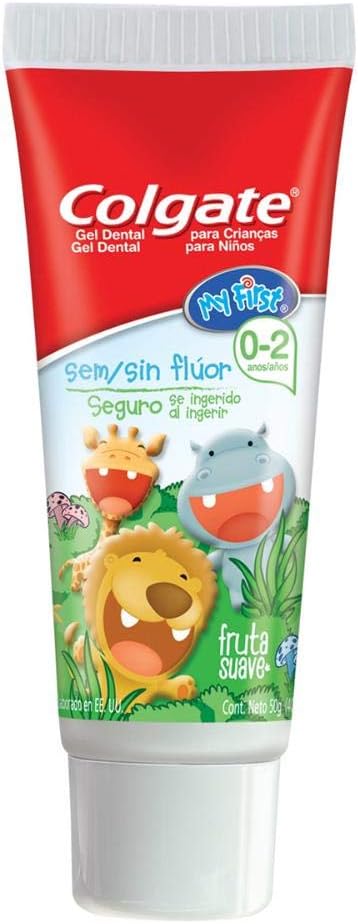
Abre ChatGPT y sube la foto de tu producto. Todavía no le escribas nada: en el paso 2 le vas a pegar el prompt que arma el storyboard.
Esta es la foto que usamos en el ejemplo. Fíjate en lo simple que es: fondo liso, producto de frente y bien iluminado.
Paso 2 — Pega el prompt del storyboard
Ver el prompt completo ↓Plegar el prompt ↑
$ Use the attached product photo (Colgate My First fruity baby toothpaste tube — white and green tube with red Colgate logo and cartoon jungle animals: lion, giraffe, hippo) as the EXACT product reference. The same real tube must appear clearly in panels 3, 6 and 9.

A single storyboard sheet: 3x3 grid of 9 equal vertical panels (9:16 each), thin white gutters. High-energy but GENTLE 3D animated baby toothpaste commercial, Pixar/DreamWorks quality, glossy, soft high-key palette of fresh green, white, red and warm fruit tones (strawberry, banana), floating soft bubbles and cute fruit motif. CONSISTENT main character across all panels: same adorable happy 1-year-old toddler, same face, hair and pajamas. Recurring trio of friendly cartoon jungle animals (lion, giraffe, hippo) matching the ones on the tube. Dynamic tilted angles and subtle motion-blur.

Panel 1: toddler waking up happily in a crib, stretching, soft morning light.
Panel 2: extreme close-up of a big open smiling baby mouth showing tiny first teeth, cute and clean, tilted angle.
Panel 3: the real Colgate My First tube squeezing fruity gel onto a small baby toothbrush, splash of strawberries, banana slices and bubbles, the tube clearly visible.
Panel 4: a parent's hand gently guiding the toddler brushing in front of a mirror, warm and tender.
Panel 5: the trio of jungle animals (lion, giraffe, hippo) popping in cheering happily around the baby.
Panel 6: soft fruity foam and playful bubbles with floating strawberries and banana slices, the Colgate My First tube standing next to the foam.
Panel 7: the toddler giggling while the brush sparkles clean.
Panel 8: extreme close-up of a bright little baby smile with a sparkle glint.
Panel 9: END CARD — the Colgate My First tube standing upright as the hero product, front and center, with the toddler and the three jungle animals celebrating around it, clean space for a logo.

Coherent character, lighting and style across all panels, the real product tube consistent wherever it appears, high detail, 4k.ChatGPT te va a devolver una lámina con 9 viñetas (3 por 3). Antes de seguir, revísala:
- ¿El producto se ve igual a la foto en las viñetas 3, 6 y 9?
- ¿El personaje tiene la misma cara en todas?
Si algo no cuadra, pídele: "Hazlo de nuevo manteniendo exactamente el mismo producto de la foto y el mismo personaje en todas las viñetas."
Cuando quede bien, descarga esa imagen: la necesitas en el paso 4.
Paso 3 — Configura Google Flow
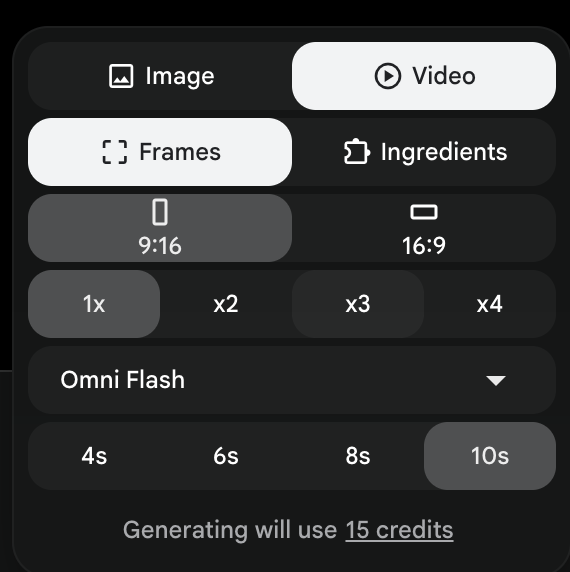
Google Flow es la herramienta de Google que convierte imágenes en video. Entra y configúrala así antes de escribir nada:
- Modo: Frames to Video
- Formato: 9:16 (vertical)
- Cantidad: x1
- Modelo: Omni Flash
- Duración: 10 s
Paso 4 — Adjunta el storyboard y pega el prompt de animación
Primero adjunta la imagen del storyboard que descargaste en el paso 2. Es obligatorio: el prompt dice "use the attached storyboard", así que sin ella el video no va a respetar tu producto ni tu personaje.
Ver el prompt completo ↓Plegar el prompt ↑
$ Use the attached storyboard as style and character reference. Animate a single continuous 10-second vertical 9:16 commercial for Colgate My First fruity baby toothpaste. Gentle but energetic, glossy 3D Pixar/DreamWorks style, soft high-key palette of fresh green, white, red and warm fruit tones, floating soft bubbles, strawberries and banana slices. Keep the SAME adorable 1-year-old toddler in green animal-print pajamas and the SAME trio of jungle animals (lion, giraffe, hippo) consistent across the whole clip. The real Colgate My First tube must appear identical whenever shown. Fast snappy cuts on the beat, one clear action per second:

0.0-1.0s: the toddler wakes up in a crib and throws both arms up laughing, giraffe mobile swaying, soft morning light; slow push-in.
1.0-2.0s: hard cut to an extreme close-up of the baby opening its mouth wide, showing tiny first teeth, sparkling brown eyes; fast zoom to the smile.
2.0-3.0s: cut, the Colgate My First tube squeezes red fruity gel onto a small toothbrush, splash of strawberries, banana slices and bubbles; quick whip-pan.
3.0-4.0s: cut, a mother's hand gently guides the toddler brushing in front of a mirror, cheeks puffing happily; short handheld sway.
4.0-5.0s: cut, the lion, giraffe and hippo pop into frame and bounce cheering around the baby who waves the toothbrush; snappy zoom-out to reveal them.
5.0-6.0s: cut, the Colgate My First tube stands upright as fruity foam bubbles up and strawberries and banana slices float around it; smooth macro dolly.
6.0-7.0s: cut, the toddler grins and lifts the toothbrush, which flashes clean with a sparkle; quick playful spin.
7.0-8.0s: cut, extreme close-up of a bright little white smile with a bright sparkle glint; hard push-in.
8.0-10.0s: final cut, the Colgate My First tube stands hero front-and-center as the baby and the three jungle animals bounce celebrating around it; slow pull-back reveal that holds for two seconds with clean space for the logo.

AUDIO — Spanish voiceover with a warm, tender, friendly Mexican accent (female, soft maternal tone), spoken naturally, synced to the timeline:
0.0-2.0s: "El primer cepillado debe ser suave... y divertido."
2.0-6.0s: "Colgate My First: sabor fruta, sin flúor, seguro si se lo traga."
6.0-8.0s: (no voiceover, only soft music and a baby giggle)
8.0-10.0s: "Sonrisas felices desde el primer dientito."
Background: gentle upbeat playful music around 120 BPM, light bubble and sparkle sound effects. The voiceover must sit clearly above the music.

Smooth camera, bubbles and fruit drifting throughout, cheerful bright lighting, high detail, 4k, no on-screen text, no watermark.En un par de minutos tendrás tu comercial terminado, con voz y música:
Si no te salió a la primera
Es normal. Estos son los tres problemas típicos y cómo se arreglan:
- El producto no se ve igual que en tu foto. Casi siempre es la foto. Usa una con fondo liso y el producto de frente, y en el prompt describe tu producto con más detalle (colores exactos, forma, dónde va el logo).
- El personaje cambia de cara entre escenas. Pídele a ChatGPT que rehaga la lámina "manteniendo el mismo personaje, misma cara y misma ropa en las 9 viñetas". Un storyboard consistente es lo que mantiene el video consistente.
- La voz no cuadra con lo que se ve. Acorta tus frases: en 10 segundos caben unas 20 palabras. Respeta los tiempos marcados en el prompt y deja un hueco sin voz, como está en el ejemplo.
Cuando te salga uno bueno, guarda tu versión del prompt: ya lo tienes listo para tu siguiente producto.