Guía · Audiovisual · Intermedio · Generación
Relight cinematográfico: ilumina tus fotos como cine
Reilumina cualquier foto de tu personaje con luz de cine (rim light, contraste, atmósfera) conservando su identidad, ropa y fondo — con un solo prompt.
¿Qué es esto y cómo lo uso?
Una guía paso a paso. Síguela de arriba hacia abajo desde tu celular; no descargas nada.
Objetivo
Convierte una foto plana de tu personaje en una imagen con luz de cine —rim light, contraste, atmósfera— sin cambiar su rostro, identidad, ropa ni fondo. Subes tu foto, pegas el prompt y listo.
Lo que necesitas
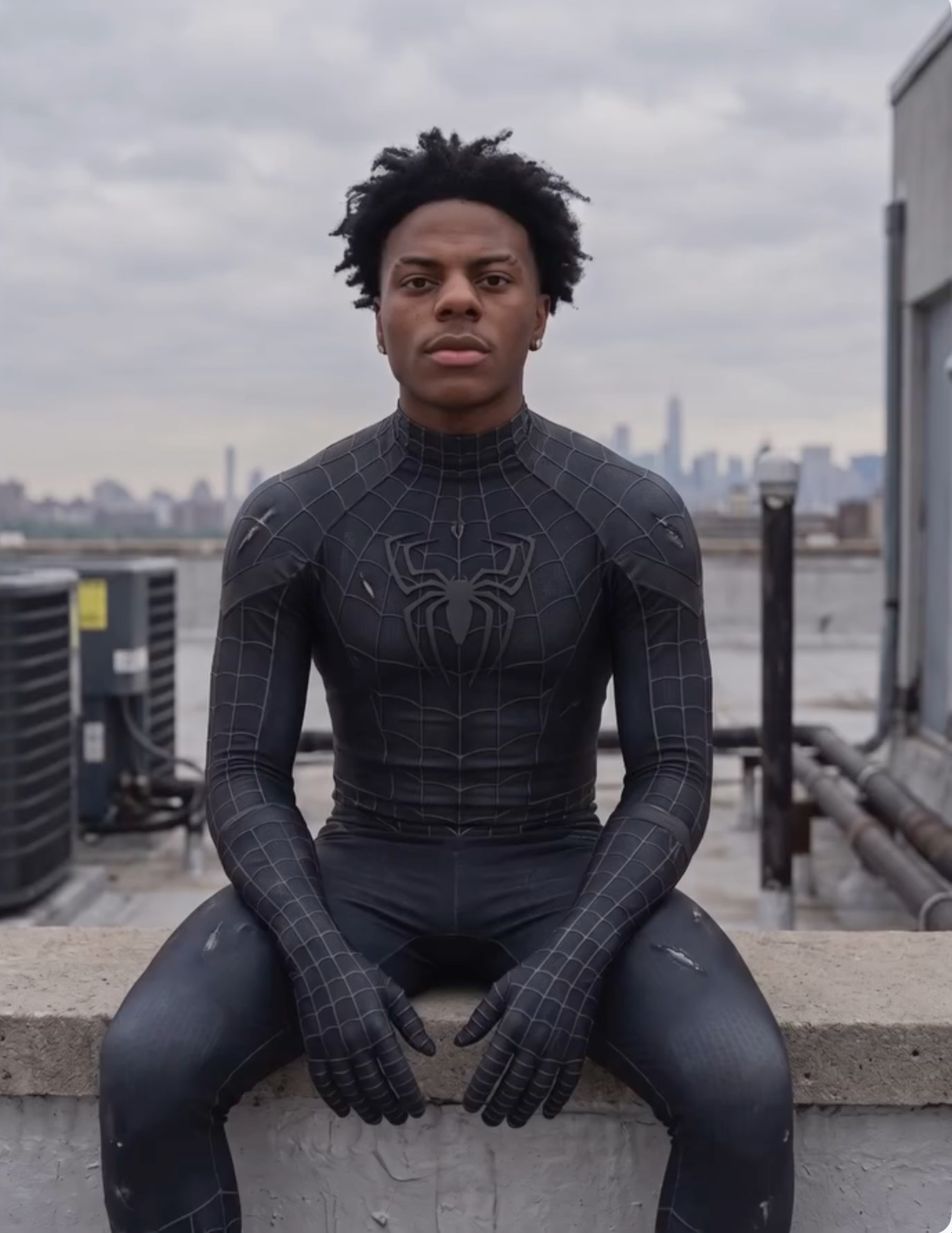
- Una foto de tu personaje (la que quieres reiluminar). Funciona mejor si es plana, sin mucho trabajo de luz — como el ejemplo de abajo.
- Un generador de imágenes con IA que edite a partir de una imagen (por ejemplo Nano Banana en Google Flow).
Paso 1 — Parte de tu foto plana
Sube tu foto tal cual. Este es el antes: luz apagada y plana, sin trabajo de iluminación.
Paso 2 — Pega este prompt
Ver el prompt completo ↓Plegar el prompt ↑
$ Transform the uploaded image into a dramatically relit, ultra-cinematic editorial photograph while preserving the original image exactly.
Maintain 100% of the subject's identity, facial structure, skin tone, hairstyle, expression, pose, body proportions, outfit, accessories, hand placement, environment, framing, perspective, camera angle, and aspect ratio. Do not redesign, replace, reposition, or regenerate any important element.
Relight the existing scene with a premium cinematic lighting setup:
a strong directional key light from above and slightly behind the subject, controlled soft fill light on the face and front of the body, luminous rim lighting around the hair, shoulders, arms, torso, legs, and clothing edges, deeper shadows and richer contrast for strong dimensional separation, realistic light falloff across the subject and surrounding environment , subtle warm highlights balanced with cool atmospheric shadows.
Darken and simplify the existing background while keeping the original location clearly recognizable. Do not replace the background or turn it into a different setting. Preserve all architecture, objects, skyline details, surfaces, and environmental elements in their original positions.
Add subtle cinematic atmosphere only where physically appropriate:
gentle environmental haze, soft volumetric light, restrained background bokeh
natural lens bloom around bright highlights, subtle light diffusion
realistic reflected light on nearby surfaces, enhanced depth between the subject and background
Shape the light around the face so the eyes, cheekbones, nose bridge, lips, and jawline remain clearly defined. Preserve natural skin texture, pores, fine facial detail, and realistic tonal variation. Avoid plastic skin, beauty-filter smoothing, artificial facial reconstruction, oversharpening, or CGI-like rendering.
Enhance the outfit using realistic material response. Preserve the exact design, stitching, textures, damage, patterns, logos, gloves, and fabric structure. Allow highlights to reveal the material naturally without changing its colour or making it unnaturally glossy.
The relighting should feel bold, expensive, cinematic, and photographically believable—like the same original photograph captured with a professional film-lighting setup.
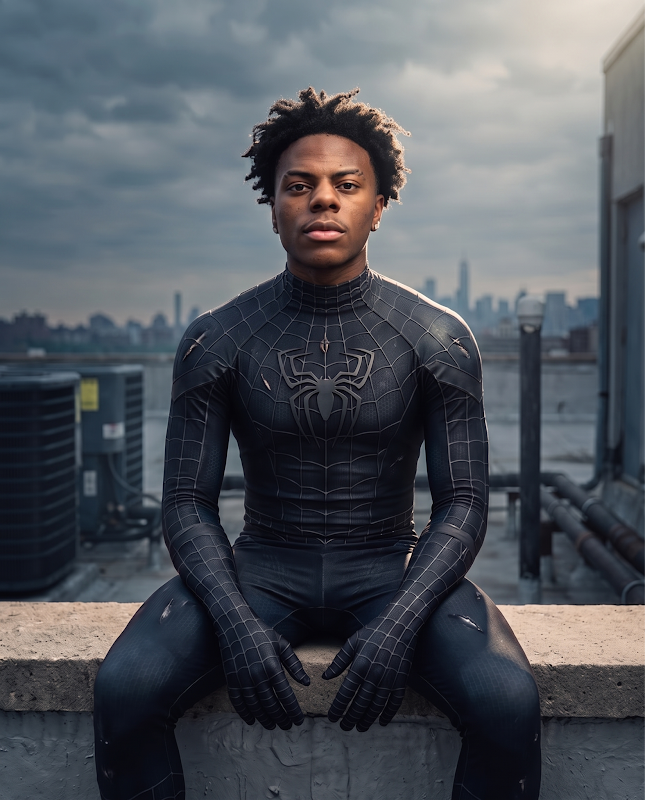
The final result must remain unmistakably the same image, with only the lighting, contrast, atmosphere, and depth professionally transformed.
Do not change the subject, face, pose, outfit, background layout, objects, composition, crop, lens perspective, or image dimensions. Do not add new props, people, lights, buildings, or environmental elements.El resultado
La misma foto, ahora con luz de cine: rim light, contraste y atmósfera — misma cara, misma ropa, mismo fondo.
Para qué te sirve
Con esto conviertes una foto plana de tu personaje en una imagen premium —lista para portadas, posts y anuncios— sin cambiar su identidad.